Autel Charge - EV Charging
Autel New Energy Co., LtdAuto & Vehicles
3.3129.00 Reviews
- Version
- 3.7.14
- Installs
- 100.00K
- Age Rating
- Everyone
Screenshots
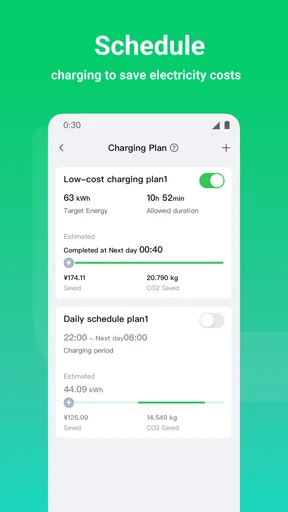
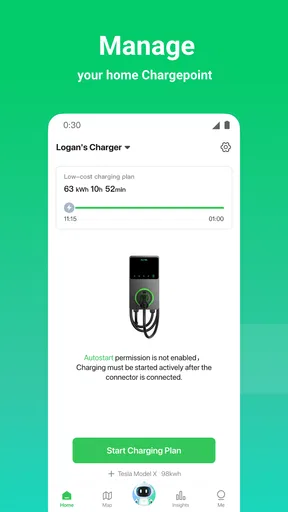
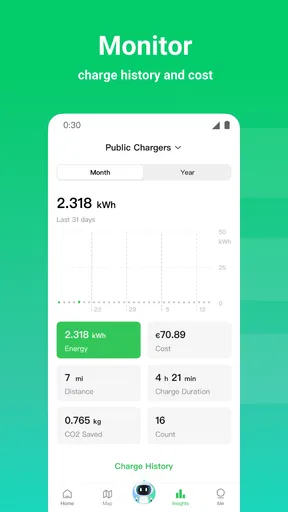
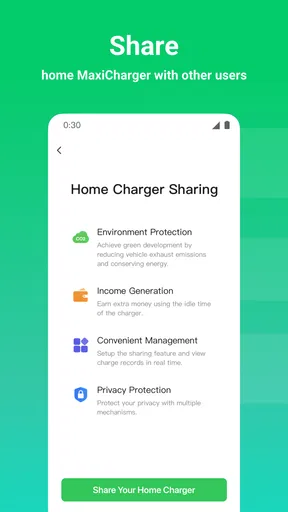
Our Review of Autel Charge - EV Charging
 Analysis by Appyee
I use EV charging apps for one simple reason: I want the car, charger, and phone to agree without making me wonder what is happening in the background. Autel Charge is built for that specific relationship. It is an Auto & Vehicles app from Autel New Energy Co., Ltd, designed to control an Autel MaxiCharger rather than act as a general-purpose charging directory.
That focus is both its strongest point and the first thing I would consider before installing it. If you own, rent, or regularly use a compatible Autel MaxiCharger, the app can become a useful remote control for charging at home or at another familiar location. If you are looking for a broad map of public charging stations, a universal tool for several charger brands, or a way to manage an EV without an Autel unit, this is probably not the app I would choose.
I spent time looking at how the app fits into a normal charging routine, where it asks for attention, and how much control it gives the person standing beside the vehicle. My overall impression is practical rather than enthusiastic: it can make a compatible charger easier to manage, but the experience depends heavily on the charger relationship, account setup, and the quality of the connection between the app and the hardware.
What Autel Charge is really for
The store summary describes the app as a way to control an Autel MaxiCharger, and that is the right mental model. I would not treat it as an independent EV companion that replaces the car’s own controls. Instead, it sits between you and the charging equipment, giving you a phone-based place to begin, monitor, or adjust a charging session when the charger itself is not within easy reach.
That distinction matters in everyday use. A driver who parks beside a home charger may not need an app every time: plugging in and checking the vehicle can be enough. The app becomes more valuable when you want to check the charger from indoors, avoid walking back outside, or manage a session while the vehicle is parked in a less convenient spot. Its usefulness is therefore tied to repeated routines, not occasional curiosity.
I also like that the app has a clear audience. Many charging applications try to cover route planning, public networks, payment, vehicle statistics, and charging hardware all at once. Autel Charge is narrower. That can feel limiting, but a focused control app is easier to understand when your main question is, “Is my MaxiCharger doing what I asked it to do?”
The application is free and rated for Everyone, which makes it approachable for households where more than one person may need to interact with the charger. It has passed the early-adopter stage too: the Android listing shows over one hundred thousand installs, an average rating of 3.3, and around one thousand four hundred ratings. I read that rating as a reason to keep expectations sensible. It suggests a useful but not universally smooth experience, especially because charging apps are affected by phones, networks, accounts, firmware, and hardware at the same time.
The first setup deserves patience
My advice is to install Autel Charge before you urgently need to charge. The worst time to learn an account flow or device-pairing process is when the battery is low and you are already late. Give yourself a calm session to sign in, identify the correct MaxiCharger, and understand which controls are available for your installation.
I would also keep the charger’s physical information close during setup. A phone app can only control the right unit if the account and device relationship are correct. If several chargers exist in the same location, naming or identifying them carefully becomes more than a cosmetic detail. It prevents the very avoidable mistake of checking one unit while the car is connected to another.
One practical habit is to finish setup while standing near the charger, then repeat the most important action from a short distance away. That test tells you whether the app is merely configured or genuinely useful in your normal home routine. It also gives you a chance to notice whether the status shown on the phone changes promptly enough for your expectations.
The current version is 3.7.14 and it requires Android 8.0 or later. Those requirements are modest enough for many Android phones, but I would still check the operating system before promising the app to a family member with an older device. On iOS or Android, the exact screens and permissions can differ, so I would judge the experience on the phone you actually plan to use rather than assume every device behaves identically.
Where the app earns its place
The clearest benefit is convenience at a distance. Imagine plugging in after arriving home during rain, then going inside while the car remains outside. Instead of returning to the driveway to inspect the charger, you can use the phone as your first check. That is a small improvement, but repeated every day it removes a surprising amount of friction.
A second useful situation is shared charging. In a household with two drivers, the person who connects the vehicle may not be the person who wants to check the session later. A dedicated charger app can make that handoff easier than relying on a single driver’s phone or the vehicle’s dashboard. I would still be careful about account sharing, though. Giving every person the same login may be convenient, but it can blur responsibility and make it harder to understand who changed a setting.
A third scenario is troubleshooting. When a session does not behave as expected, the app can help you separate a charger problem from a vehicle problem or a simple connection issue. I would compare what the app reports with the physical indicators on the MaxiCharger and the car. No phone screen should be treated as the only source of truth during a charging fault.
That last point is important. Remote control is helpful, but it can also create false confidence. A command sent from the phone is not the same thing as visually confirming that the cable is secure and the vehicle is actually receiving energy. My preferred workflow is to use the app for convenience, then make a quick physical check whenever the charging result matters.
Trust starts with visible control
For me, trust in a charging app is not created by a polished interface. It comes from knowing what I am controlling, when an action takes effect, and whether the app makes the consequences clear. Autel Charge is easier to trust when I use it as a direct control layer for a known MaxiCharger, because the purpose is concrete rather than vague.
I would pay close attention to every permission request during installation and normal use. Permissions are not a minor technical detail in a device-control app. They can affect location, notifications, nearby-device communication, and account access depending on the phone and operating system. I do not enable a permission automatically just because the app asks. I read the explanation, decide whether that permission matches the action I want, and revisit it later if I no longer need the related function.
The same approach applies to notifications. Charging alerts can be useful if they tell me that a session needs attention, but constant or unclear notifications become noise. I prefer enabling only the alerts that help me make a decision. If a notification does not explain what happened or what I should do next, it adds less value than a clear status screen.
Account control is another area where I recommend caution. Use a strong, unique password and avoid treating the app login as a casual shared credential. If another person needs access, decide whether they need full control or only occasional visibility. The right choice depends on how the charger is used, but the principle is simple: access should match responsibility.
I would also review the account and device screens after setup, not only during a problem. Look for connected equipment, signed-in sessions, and settings that affect who can operate the charger. This is a useful habit with any connected hardware. It helps you notice an old phone, an unused account, or a charger association that no longer reflects your household.
Data-sensitive moments in daily charging
Charging apps naturally touch information that can reveal routines. Even without making assumptions about Autel Charge’s specific data practices, I would treat charging times, vehicle presence, and location-related choices as sensitive. A regular charging pattern can say when someone arrives home, when a vehicle is usually parked, or how often a particular location is used.
That is why I would avoid granting broader access than the task requires. If the app offers a choice between precise and approximate location, I would select the least precise option that still supports the feature I need. If location is not necessary for my chosen workflow, I would leave it disabled and see whether the core charger controls continue to work.
I would make the same decision with Bluetooth, nearby-device access, contacts, photos, microphone, and notifications: each permission should have a visible reason. A charger controller does not need to become a general-purpose app on my phone. When a permission prompt appears, I want to understand the immediate benefit before accepting it.
There is also a privacy issue that is easy to overlook: the phone itself. If charging notifications appear on a lock screen, another person may see information about the vehicle or the timing of a session. I would use the phone’s notification privacy settings if the device is shared or frequently left in public view. This is not a criticism unique to Autel Charge; it is a practical consequence of putting connected-device events on a personal screen.
When I troubleshoot, I try not to send more information than necessary. A screenshot can be helpful, but it may show an account name, device identifier, location, or charging history. Before sharing one with support or another person, I would crop or hide details that are unrelated to the problem. That small step protects privacy without making troubleshooting impossible.
How much agency does the user have?
The best charging app is not the one with the most buttons. It is the one that lets me understand the current state and make a deliberate change without guessing. Autel Charge has a sensible role here because it is connected to a specific charger family, but I would still verify each command through the charger and vehicle rather than assuming the phone action completed perfectly.
For a normal session, I would use a three-step check. First, confirm that the correct MaxiCharger is selected. Second, check the status shown in the app against the cable and vehicle. Third, after starting or changing anything, wait long enough to see whether the physical charging state agrees. This is especially useful when the phone has a weak connection or the app takes time to refresh.
One non-obvious trade-off is that remote control can make people less attentive to the cable itself. I have found that the most reliable routine is to treat the app as a confirmation and convenience tool, not a substitute for safe parking, correct connector placement, or checking the vehicle’s own charging message. If the car reports an error while the app appears normal, I would trust the warning from the car and investigate before continuing.
Another useful habit is to separate configuration from everyday operation. Settings that affect how the charger behaves should be reviewed when you are not in a hurry. Daily charging should then involve only the few actions you understand well. This reduces accidental changes and makes it easier to notice when something unusual has happened.
If multiple people use the charger, agree on a simple household rule: one person changes configuration, while everyone can report a problem. That is not a feature claim about the app; it is a way to reduce confusion when several phones and drivers are involved. A shared process is often more dependable than informal account sharing.
Where it differs from usual alternatives
Compared with the vehicle manufacturer’s app, Autel Charge has a narrower but more hardware-centered purpose. The car app may be better for battery information, cabin controls, vehicle location, or broader ownership tasks. Autel Charge is the more natural place to look when the question concerns the MaxiCharger itself.
Compared with a public charging network app, it serves a different moment. Network apps are usually more useful when I am away from home and need to find a station, understand availability, or handle a public-session workflow. Autel Charge makes more sense when the charger is already known and installed. Choosing between them is not about which app is universally better; it is about whether I am searching for a place to charge or managing the equipment in front of me.
Compared with using the charger’s physical controls alone, the phone offers more convenience but adds another layer that can fail. The physical unit remains useful when the phone battery is low, the network is unreliable, or the app needs attention. I would not remove that fallback from my routine. A good connected-device setup should still be usable when the smart part is temporarily inconvenient.
There is also a trade-off against a universal EV app. A universal option may reduce the number of applications on a driver’s phone, especially for people who use several charging brands. The cost is that it may not expose the same direct relationship with a particular Autel charger. If detailed control of one MaxiCharger matters more than keeping everything in one app, the dedicated option is easier to justify.
Who should install it, and who should skip it?
I would recommend trying Autel Charge if you have an Autel MaxiCharger and want to manage charging from your phone. It is especially suitable for home users who charge frequently, households with more than one driver, and anyone who values checking a charger without repeatedly going outside.
I would be more cautious if you rarely use the charger, prefer physical controls, or dislike maintaining separate accounts for connected equipment. In those cases, the extra app may not repay its setup effort. Someone shopping for public charging locations should also start with an app that is designed around station discovery and public-session management rather than assume this one will cover every EV need.
I would skip it as a primary solution if my charger is not an Autel MaxiCharger or if I need one dashboard for several unrelated charger brands. Compatibility is the central question, and no amount of interface preference can compensate for choosing a controller that does not match the hardware.
For families, I would install it only after deciding who needs access and what each person is expected to do. For privacy-conscious users, I would proceed with permission prompts carefully and keep location, notifications, and nearby-device access aligned with actual use. The app can be convenient without being given more access than necessary.
My cautious verdict after using it
Autel Charge is a focused tool rather than a complete EV ownership platform. I appreciate that its purpose is easy to understand: it brings control of an Autel MaxiCharger to the phone. In the right setup, that can turn a repetitive charging task into a calmer routine, particularly when the charger is outside, shared, or not easy to inspect directly.
At the same time, I would not judge it only by how quickly a command appears on screen. Reliable charging involves the app, the MaxiCharger, the car, the phone, the account, and the connection between them. When those pieces agree, the app feels useful. When they do not, the user needs clear habits and a physical fallback rather than blind trust in a remote status.
The 3.3 average from roughly one thousand four hundred ratings makes me approach it as a practical app that may require patience, not as a flawless control center. That is a fair expectation for connected hardware. I would install it before a busy charging day, review permissions and account access, test the basic workflow nearby, and keep the charger and vehicle indicators in the loop.
My recommendation is therefore conditional but positive: Autel Charge is worth using when your daily charging revolves around an Autel MaxiCharger. It is free, available to an Everyone audience, and supports a useful phone-based routine. Just do not confuse its focused role with a universal EV app, and do not let remote convenience replace a quick physical check when the charging result really matters.
Autel New Energy Co., Ltd has made an app that can be valuable precisely because it stays close to its hardware. Whether it becomes essential depends on your charging habits. For me, it works best as a controlled, privacy-aware convenience layer: helpful when I need distance and visibility, but never the only thing I rely on to know that the car is charging safely.
Verdict
Strengths of Autel Charge - EV Charging
- Find and start compatible EV chargers from one convenient app.
- Live charger status helps you avoid unavailable charging points.
- Supports route planning around charging needs and vehicle range.
- Charging history makes it easier to track sessions and energy use.
- Useful for managing Autel-compatible home and public charging equipment.
Limitations of Autel Charge - EV Charging
- Coverage and features may vary significantly by country or charging network.
- Some stations may show outdated availability or pricing information.
- Account creation and vehicle setup can take time before the first charge.
- Payment methods and billing support may differ between supported locations.
- The app is less useful if you rarely use Autel or partner charging stations.
Similar Picks in This Category
View All
Android Auto
Google LLC4.1

maxim — order a taxi & food
PT. SITO4.7

Штрафы ГИБДД: проверка с фото
Pays LLC – Штрафы ГИБДД4.7

Номерограм – проверка авто
Авто Ассист4.8

Дром Авто
Дром4.9

Frequently Asked Questions
What is Autel Charge – EV Charging used for?
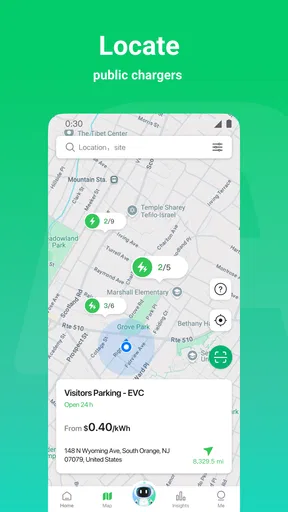
Autel Charge – EV Charging is a mobile app designed to help electric vehicle drivers locate compatible charging stations, check station information, and manage charging sessions. Depending on the charger and region, users may be able to view availability, start or stop a session, monitor charging progress, review pricing, and receive payment or session details directly through the app.
Can I use Autel Charge with any electric vehicle or charging station?
Compatibility depends on the vehicle, charger model, connector type, and local network support. The app is primarily intended for Autel charging equipment and participating stations, so not every public charger will necessarily appear or support remote controls. Before relying on a location, check the connector information, power rating, station status, and any compatibility notes shown in the app.
Does Autel Charge require an account, and how do payments work?
Many of the app’s main functions, particularly starting a charging session, saving vehicles, and managing payment information, may require users to create or sign in to an account. Payment methods and billing options can vary by country and charging network. Review the displayed price, possible connection fees, idle fees, and applicable taxes before beginning a session.
Can Autel Charge show real-time charger availability and charging progress?
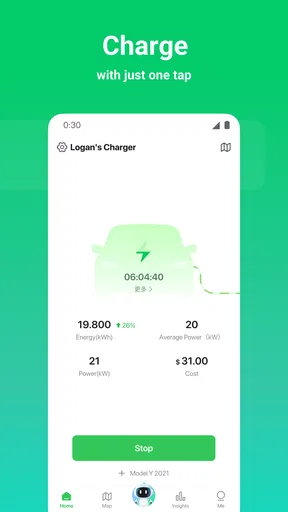
The app can provide station details such as location, connector type, power output, and, where supported by the charger network, current availability. During an active session, it may also display charging time, energy delivered, estimated cost, or session status. Information can occasionally be delayed, so it is wise to confirm the charger’s physical status when you arrive.
Is Autel Charge free to download, and are there additional charging costs?
Autel Charge is generally available to download without an upfront app purchase, but using a charging station may involve separate costs. Prices can differ according to location, charger speed, operator, time of use, and membership terms. Some stations may also apply parking, idle-time, or service fees, so always check the station’s pricing details before plugging in.
